
Technical SEO · Supporting checklist

Orphan Page Audit Checklist

Find orphan page candidates, rule out false positives and restore useful internal routes. Compare URL inventories, choose fixes and verify the result.

Free to useNo account neededSaved in your browser
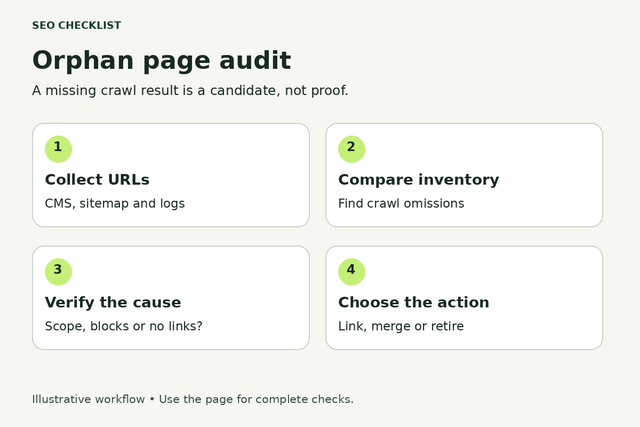
Four orphan page audit stages: collect URLs, compare the crawl, verify the cause, and choose an action.
A missing crawl result is a candidate, not proof.
Your working checklist

Work through the checklist

Click a square to mark a task as Pass. Click again to undo. Use the result menu for a problem, a blocker or a task that does not apply. You do not need to enter notes.

14 checks

Collect trustworthy URL and crawl evidence

Establish a trustworthy baseline before changing the site.

Define what should be reachable in this audit

Not every URL found in a report belongs in public navigation.

Use this for: Public pages within the agreed audit scope.

Write down the hosts, sections, languages and page types in scope. Separate public content from account pages, private downloads, paid-campaign variants and historical URLs. Record deliberate exceptions with an owner; an audit must not expose private content simply to remove a warning.

Example

Hypothetical example: A thank-you page and an evergreen pricing guide need different discovery decisions.

  1. Choose public hosts and sections.
  2. List excluded private or utility page types.
  3. Assign an owner to exceptions.
More help and optional notesHigh · Site owner or SEO lead; developer for template changes
PassScope and exceptions are explicit before classification.
FailEvery discovered URL is treated as a page that must be linked publicly.

If it fails: Confirm purpose and access requirements with the site owner.

Retest: Repeat the same check on the published site and record whether the original failure is resolved.

Not applicable: No pages in the stated scope.

Keep in mind: This is a manual audit workflow, not an automatic site scan or a guarantee of search performance.

Optional: URLs checked, finding, decision, owner and retest result. Keep confidential data out of shared exports.

No result recorded yet.

Changing this result updates your checkmark and progress immediately. Notes are optional.

Collect URLs from sources independent of the crawl

A link-following crawl cannot reveal every disconnected page by itself.

Use this for: Public pages within the agreed audit scope.

Collect a CMS or published-page export and available sitemap URLs. Add authorized analytics landing-page, Search Console or server-log URL exports when available. Record dates and coverage. These sources can include old or incomplete data, so preserve where each candidate came from.

Example

Hypothetical example: A CMS export contains a published guide absent from the homepage crawl and the current sitemap.

  1. Export the published inventory.
  2. Add available independent URL sources.
  3. Record source and date for each set.
More help and optional notesHigh · Site owner or SEO lead; developer for template changes
PassAt least one independent inventory can be compared with link discovery.
FailThe only inventory is the same crawl being checked for missing pages.

If it fails: Obtain a published-page list or other authorized URL inventory.

Retest: Repeat the same check on the published site and record whether the original failure is resolved.

Not applicable: No pages in the stated scope.

Keep in mind: This is a manual audit workflow, not an automatic site scan or a guarantee of search performance.

Optional: URLs checked, finding, decision, owner and retest result. Keep confidential data out of shared exports.

No result recorded yet.

Changing this result updates your checkmark and progress immediately. Notes are optional.

Reconcile URL formats without merging different pages

Careless cleanup can hide candidates or create false mismatches.

Use this for: Public pages within the agreed audit scope.

Keep the raw URL and a separate comparison value. Resolve relative addresses using the correct host. Review redirects and preferred hosts explicitly. Do not blindly lowercase paths, discard all query parameters or remove trailing slashes when those differences may represent different resources.

Example

Hypothetical example: An uppercase product code must not be merged with a lowercase URL without checking how the site handles it.

  1. Keep an untouched copy of source exports.
  2. Apply only verified normalization rules.
  3. Review ambiguous variants manually.
More help and optional notesHigh · Site owner or SEO lead; developer for template changes
PassMatches use documented rules that preserve meaningful differences.
FailAutomatic cleanup silently combines distinct URLs.

If it fails: Correct the comparison rules and rerun the join.

Retest: Repeat the same check on the published site and record whether the original failure is resolved.

Not applicable: No pages in the stated scope.

Keep in mind: This is a manual audit workflow, not an automatic site scan or a guarantee of search performance.

Optional: URLs checked, finding, decision, owner and retest result. Keep confidential data out of shared exports.

No result recorded yet.

Changing this result updates your checkmark and progress immediately. Notes are optional.

Run a crawl that tests discovery from the homepage

Being fetched from a seed list does not prove a navigation path exists.

Use this for: Public pages within the agreed audit scope.

Run a link-discovery crawl from the canonical homepage or agreed section root. Record scope, rendering mode, limits, exclusions and completion status. If the tool also imports sitemaps or other URL sources, retain its discovery-source and link-path data so imported URLs are not mistaken for internally discovered pages.

Example

Hypothetical example: A sitemap import fetches a page successfully but the discovery crawl still has no route to it.

  1. Set the agreed start URL.
  2. Save crawl settings and limits.
  3. Keep fetched-by-import separate from found-by-links.
More help and optional notesHigh · Site owner or SEO lead; developer for template changes
PassThe report distinguishes link discovery from imported or directly seeded URLs.
FailA combined fetch list is treated as proof every URL is reachable.

If it fails: Use the tool’s link-path report or a separate discovery-only crawl.

Retest: Repeat the same check on the published site and record whether the original failure is resolved.

Not applicable: No pages in the stated scope.

Keep in mind: This is a manual audit workflow, not an automatic site scan or a guarantee of search performance.

Optional: URLs checked, finding, decision, owner and retest result. Keep confidential data out of shared exports.

No result recorded yet.

Changing this result updates your checkmark and progress immediately. Notes are optional.

Build a candidate list before declaring pages orphaned

A mismatch is a lead to investigate, not a final diagnosis.

Use this for: Public pages within the agreed audit scope.

Compare independent inventory URLs with URLs reached through internal links. Keep source, live status and observed discovery route beside each unmatched URL. On a spreadsheet, a lookup or join can flag missing matches; inspect the result before labeling a page an orphan.

Example

Hypothetical example: A URL from last year’s analytics is unmatched because it now redirects to a current guide.

  1. Join inventory to discovery results.
  2. Filter unmatched URLs.
  3. Keep source and status columns for triage.
More help and optional notesHigh · Site owner or SEO lead; developer for template changes
PassCandidates are separated from confirmed findings and redirects.
FailEvery unmatched export row is reported as a live orphan.

If it fails: Inspect candidates and label the reason for each mismatch.

Retest: Repeat the same check on the published site and record whether the original failure is resolved.

Not applicable: No pages in the stated scope.

Keep in mind: This is a manual audit workflow, not an automatic site scan or a guarantee of search performance.

Optional: URLs checked, finding, decision, owner and retest result. Keep confidential data out of shared exports.

No result recorded yet.

Changing this result updates your checkmark and progress immediately. Notes are optional.

Classify candidates and select useful fixes

Review specific failures and select the smallest useful fix.

Rule out incomplete crawling and rendering errors

Tool limitations can look like missing site links.

Use this for: Public pages within the agreed audit scope.

For a candidate, inspect the expected parent or source page. Check crawl limits, excluded paths, robots restrictions, errors and whether the link appears only after rendering. Do not switch off real site protections merely to make the report complete. Escalate uncertainty to the developer or crawl operator.

Example

Hypothetical example: An archive was excluded by a crawl filter, so its linked guides were absent from the report even though visitors could reach them.

  1. Inspect the expected linking page.
  2. Check crawl exclusions and completion.
  3. Test rendering where relevant.
More help and optional notesHigh · Site owner or SEO lead; developer for template changes
PassConfirmed findings remain missing after configuration and rendering causes are considered.
FailA capped or filtered crawl is presented as a complete orphan audit.

If it fails: Correct authorized crawl settings or document the incomplete scope.

Retest: Repeat the same check on the published site and record whether the original failure is resolved.

Not applicable: No pages in the stated scope.

Keep in mind: This is a manual audit workflow, not an automatic site scan or a guarantee of search performance.

Optional: URLs checked, finding, decision, owner and retest result. Keep confidential data out of shared exports.

No result recorded yet.

Changing this result updates your checkmark and progress immediately. Notes are optional.

Check whether incoming links belong to a disconnected cluster

A page can have an incoming link and still lack a route from the main site.

Use this for: Public pages within the agreed audit scope.

Trace the incoming linking page back toward the agreed starting point. Ignore a page’s link to itself as evidence of integration. If two old pages only link to each other, record the cluster rather than marking both healthy because each has an inlink.

Example

Hypothetical example: Two campaign guides link to one another but neither is reachable from any live category.

  1. Inspect incoming internal links.
  2. Trace a route from the start page.
  3. Group disconnected clusters by likely cause.
More help and optional notesMedium · Site owner or SEO lead; developer for template changes
PassA valid path from the agreed public starting point is documented.
FailOnly self-links or links from another disconnected page exist.

If it fails: Connect the useful cluster to the relevant reachable section.

Retest: Repeat the same check on the published site and record whether the original failure is resolved.

Not applicable: No pages in the stated scope.

Keep in mind: This is a manual audit workflow, not an automatic site scan or a guarantee of search performance.

Optional: URLs checked, finding, decision, owner and retest result. Keep confidential data out of shared exports.

No result recorded yet.

Changing this result updates your checkmark and progress immediately. Notes are optional.

Classify each candidate before choosing a fix

Purpose and current state determine whether reintegration is appropriate.

Use this for: Public pages within the agreed audit scope.

Separate useful live public pages from redirects, broken URLs, alternate versions and intentionally restricted pages. Check canonical and indexing signals when they affect the decision. A noindex page can still serve visitors, and an indexable page is not automatically worth retaining.

Example

Hypothetical example: An old duplicate guide should not receive new links when its maintained replacement already satisfies the same purpose.

  1. Open the candidate and note status.
  2. Confirm purpose and preferred version.
  3. Choose retain, investigate, consolidate, retire or documented exception.
More help and optional notesMedium · Site owner or SEO lead; developer for template changes
PassEvery reviewed candidate has a reasoned disposition.
FailAll candidates receive links or deletion without reviewing purpose.

If it fails: Resolve ownership and preferred destination before changing the site.

Retest: Repeat the same check on the published site and record whether the original failure is resolved.

Not applicable: No pages in the stated scope.

Keep in mind: This is a manual audit workflow, not an automatic site scan or a guarantee of search performance.

Optional: URLs checked, finding, decision, owner and retest result. Keep confidential data out of shared exports.

No result recorded yet.

Changing this result updates your checkmark and progress immediately. Notes are optional.

Prioritize useful pages with evidence, not promises

The most valuable fixes are not necessarily the largest URL group.

Use this for: Public pages within the agreed audit scope.

Prioritize current pages that support important visitor tasks, active offers or useful reference content. Use available performance and referral evidence cautiously. Low recorded traffic alone is not a reason to remove a page; data may be incomplete or the page may serve a non-search purpose.

Example

Hypothetical example: A current warranty guide deserves attention even if a short analytics window shows few visits.

  1. Record business and visitor purpose.
  2. Add available performance evidence with dates.
  3. Order fixes by importance and confidence.
More help and optional notesMedium · Site owner or SEO lead; developer for template changes
PassThe repair order reflects usefulness and documented evidence.
FailPriority relies on invented traffic gains or an unexplained tool score.

If it fails: Replace guesses with observable purpose and available data.

Retest: Repeat the same check on the published site and record whether the original failure is resolved.

Not applicable: No pages in the stated scope.

Keep in mind: This is a manual audit workflow, not an automatic site scan or a guarantee of search performance.

Optional: URLs checked, finding, decision, owner and retest result. Keep confidential data out of shared exports.

No result recorded yet.

Changing this result updates your checkmark and progress immediately. Notes are optional.

Add a relevant link from a reachable page

A meaningful route is more useful than a token link added to clear a warning.

Use this for: Public pages within the agreed audit scope.

Choose a reachable hub, category or related article where the destination answers the visitor’s next question. Add a descriptive link to the preferred live URL. Do not rely on a new page that is itself disconnected or a sitewide block of unrelated links.

Example

Hypothetical example: A useful cleaning schedule is linked from the existing equipment-care hub beside its maintenance guidance.

  1. Choose an already reachable source.
  2. Add a contextual destination link.
  3. Open the link on the published source page.
More help and optional notesMedium · Site owner or SEO lead; developer for template changes
PassThe destination has an appropriate working link from a reachable page.
FailThe link is irrelevant, broken or comes only from another orphan.

If it fails: Move the link to a useful reachable source and correct its target.

Retest: Repeat the same check on the published site and record whether the original failure is resolved.

Not applicable: No pages in the stated scope.

Keep in mind: This is a manual audit workflow, not an automatic site scan or a guarantee of search performance.

Optional: URLs checked, finding, decision, owner and retest result. Keep confidential data out of shared exports.

No result recorded yet.

Changing this result updates your checkmark and progress immediately. Notes are optional.

Repair shared causes and verify discovery

Verify the live result and prevent the same problem recurring.

Fix the publishing rule when whole groups are affected

A template-level gap can recreate hundreds of individual findings.

Use this for: Public pages within the agreed audit scope.

Group candidates by page type, category and publication period. Check whether a missing category assignment, archive pagination rule or expired related-content module caused the gap. Ask the developer to fix the shared route and test multiple affected examples rather than hand-linking every URL blindly.

Example

Hypothetical example: All guides in one new category are missing because the category listing was never added to the resource hub.

  1. Look for repeated page types or dates.
  2. Identify the shared missing route.
  3. Test the repair on several affected pages.
More help and optional notesMedium · Site owner or SEO lead; developer for template changes
PassThe shared cause is repaired and representative pages are reachable.
FailOnly isolated symptoms are patched while the template continues creating gaps.

If it fails: Correct the assignment or template logic and rerun the group check.

Retest: Repeat the same check on the published site and record whether the original failure is resolved.

Not applicable: No shared cause or repeated page group is found.

Keep in mind: This is a manual audit workflow, not an automatic site scan or a guarantee of search performance.

Optional: URLs checked, finding, decision, owner and retest result. Keep confidential data out of shared exports.

No result recorded yet.

Changing this result updates your checkmark and progress immediately. Notes are optional.

Handle consolidation or retirement deliberately

Not every old URL should be restored to navigation.

Use this for: Public pages within the agreed audit scope.

For redundant pages, agree whether a maintained page truly replaces them. Use the appropriate redirect or removal workflow and update remaining references. Preserve useful material before retiring it when needed. Do not send unrelated URLs to the homepage or delete solely because a report says orphan.

Example

Hypothetical example: A superseded event page may need an archive decision rather than an irrelevant redirect to current services.

  1. Confirm the page’s owner and purpose.
  2. Choose a relevant replacement or retirement response.
  3. Update links and inventory records.
More help and optional notesMedium · Site owner or SEO lead; developer for template changes
PassRetired or consolidated URLs have an approved, appropriate disposition.
FailPages are removed without review or redirected to unrelated destinations.

If it fails: Review the destination or removal decision with the owner.

Retest: Repeat the same check on the published site and record whether the original failure is resolved.

Not applicable: Every confirmed candidate will be retained at its current URL.

Keep in mind: This is a manual audit workflow, not an automatic site scan or a guarantee of search performance.

Optional: URLs checked, finding, decision, owner and retest result. Keep confidential data out of shared exports.

No result recorded yet.

Changing this result updates your checkmark and progress immediately. Notes are optional.

Align the sitemap with the final page decisions

A sitemap and the internal link structure serve different purposes.

Use this for: Public pages within the agreed audit scope.

Review whether retained preferred URLs belong in the current sitemap. Remove stale entries when pages are retired or replaced according to your sitemap policy. Do not count sitemap inclusion as the internal link fix: verify both independently.

Example

Hypothetical example: The restored guide remains in the sitemap, but completion also requires its new hub link to work.

  1. Compare sitemap entries with final dispositions.
  2. Correct stale or missing preferred URLs.
  3. Keep the internal-route test separate.
More help and optional notesMedium · Site owner or SEO lead; developer for template changes
PassSitemap entries reflect intended pages and links are checked independently.
FailAdding a URL to the sitemap is recorded as restoring internal navigation.

If it fails: Update the sitemap and complete a separate link-path retest.

Retest: Repeat the same check on the published site and record whether the original failure is resolved.

Not applicable: No pages in the stated scope.

Keep in mind: This is a manual audit workflow, not an automatic site scan or a guarantee of search performance.

Optional: URLs checked, finding, decision, owner and retest result. Keep confidential data out of shared exports.

No result recorded yet.

Changing this result updates your checkmark and progress immediately. Notes are optional.

Recrawl from the start point and record exceptions

A direct URL fetch cannot prove the orphan repair worked.

Use this for: Public pages within the agreed audit scope.

Repeat link discovery using comparable settings after the changes are live. Confirm the retained page is reached from the agreed start and the new link survives normal template updates. Keep deliberate exceptions with reasons and review dates. Recheck after migrations, category changes and large content removals.

Example

Hypothetical example: The guide now appears in a fresh homepage crawl through Resources → Care guides, not just through a manually supplied URL.

  1. Run comparable link discovery.
  2. Record the discovered source and path.
  3. Save unresolved cases and intentional exceptions.
More help and optional notesMedium · Site owner or SEO lead; developer for template changes
PassRetained pages are rediscovered through valid routes; exceptions are documented.
FailThe only retest is a successful direct fetch or a stale report.

If it fails: Repair the route or record the unresolved cause before closing the task.

Retest: Repeat the same check on the published site and record whether the original failure is resolved.

Not applicable: No pages in the stated scope.

Keep in mind: This is a manual audit workflow, not an automatic site scan or a guarantee of search performance.

Optional: URLs checked, finding, decision, owner and retest result. Keep confidential data out of shared exports.

No result recorded yet.

Changing this result updates your checkmark and progress immediately. Notes are optional.

Reset this checklist?

This removes saved statuses, evidence and result dates for the checks on this page. Other checklists keep their records. Export a CSV first if you need a copy.

A useful result, every time

Check a task. Choose a result.

This is a manual SEO workflow. It helps you decide what to investigate and keep a usable record. It does not crawl your website or verify your answers automatically.

  1. Choose your scope. Pick the relevant task group and representative pages you are authorized to inspect.
  2. Run the stated check. Follow the steps, then choose your result. Click the square for Pass, or use the result menu for another status. You do not need to type anything.
  3. Assign the next action. Fix a problem when you can, or ask the right person for help. Optional notes can remind you what to do next. Check the result again after a fix.

What your progress means

Review progress counts passes and failures against applicable checks. Failed work still counts as reviewed. Blocked and untested checks remain unfinished. This is not an SEO score.

Untested
You have not checked this yet.
Pass
You checked it and it works as described.
Fail
You checked it and found something to fix.
Blocked
You need access, information or someone’s help.
Not applicable
This task does not apply to your website.

Export CSV downloads the checks currently shown and any optional notes. Print expands the instructions for that view. Saved results stay in this browser; there is no account sync.

Apply the workflow

Keep this audit focused

This checklist covers URL inventory reconciliation, candidate classification and repair verification. It does not automatically crawl your website or replace a full content, indexing or architecture audit.

What is an orphan page?

For this audit, an orphan is a page with no observed internal link path from the agreed public starting point. Tool definitions vary: some report zero incoming links, while others also detect clusters that link to one another but are disconnected from the main site. State which definition your report uses.

An orphan is not the same as a dead-end page, which has no useful onward links. A page can also be reachable but deeply buried. Classify these separately so the repair matches the problem.

How do you find orphan pages reliably?

Compare a link-discovery crawl against an independently collected URL inventory, then investigate the unmatched URLs. Keep the source and date of each URL list, check crawl coverage and separate imported URLs from those actually reached through links.

A candidate becomes a confirmed finding only after reasonable checks for old URLs, redirects, exclusions, rendering and deliberate exceptions. The absence of a URL from one report does not prove that no internal link exists anywhere.

Orphan page audit: common questions

Can an orphan page be indexed? Yes, a search engine may discover a URL through other routes. Index status does not establish that the page is properly integrated into your site.

Does adding a sitemap entry fix an orphan? It can help discovery, but it does not create a useful internal navigation path. Test the sitemap and the link route as separate checks.

Should all orphan pages be deleted? No. Restore useful public pages, investigate uncertain cases and document intentional exceptions. Consolidate or retire a page only after reviewing its purpose and an appropriate destination or response.

Can I do this without a paid crawler? For a small site, a CMS export, a spreadsheet and manual route checks can provide a limited audit. State the coverage honestly; do not claim a complete site-wide result when you only checked a sample.

Connect This Review to Your Technical Audit

Use this specialist workflow for the specific issue, then review the wider technical conditions separately.

A clear process, with honest limits.

Follow the steps, choose the result that matches what you found, and check again after changes. Notes are optional. A completed check does not guarantee indexing, traffic or rankings. How the checklists work.