
Technical SEO · Supporting checklist

Website Architecture SEO Checklist

Review your website hierarchy, hubs and navigation. Use practical checks to make important pages reachable without unnecessary URL changes.

Free to useNo account neededSaved in your browser
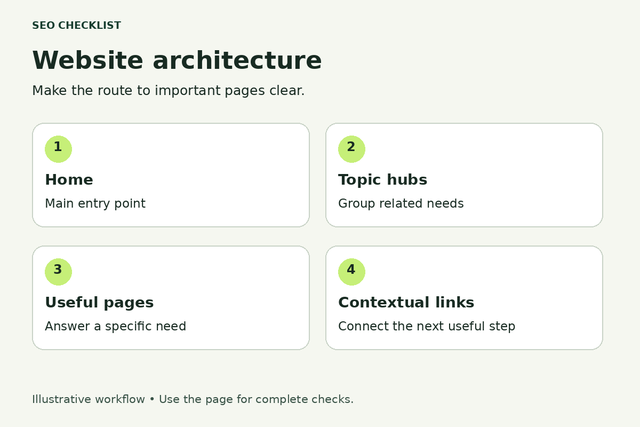
A simple hierarchy connects home, topic hubs and useful pages with contextual links.
Make the route to important pages clear.
Your working checklist

Work through the checklist

Click a square to mark a task as Pass. Click again to undo. Use the result menu for a problem, a blocker or a task that does not apply. You do not need to enter notes.

13 checks

Map the structure and key journeys

Establish a trustworthy baseline before changing the site.

Choose the journeys the structure must support

A sensible hierarchy starts with the visitor’s task, not a list of keywords.

Use this for: Public pages within the agreed audit scope.

List the main things visitors need to accomplish and the pages that support them. Separate buying, comparing, learning and support journeys when they need different destinations. Use business priorities and observed customer questions rather than inventing traffic estimates.

Example

Hypothetical example: A repair business separates booking a repair from reading a troubleshooting guide.

  1. Name three to five representative visitor tasks.
  2. Assign an existing destination to each task.
  3. Flag tasks with no useful destination.
More help and optional notesHigh · Site owner or SEO lead; developer for template changes
PassEach priority task has a named destination and owner.
FailThe map groups pages only by keywords or leaves essential journeys undefined.

If it fails: Agree on the missing destinations before changing menus.

Retest: Repeat the same check on the published site and record whether the original failure is resolved.

Not applicable: No pages in the stated scope.

Keep in mind: This is a manual audit workflow, not an automatic site scan or a guarantee of search performance.

Optional: URLs checked, finding, decision, owner and retest result. Keep confidential data out of shared exports.

No result recorded yet.

Changing this result updates your checkmark and progress immediately. Notes are optional.

Map the current hierarchy without renaming URLs

A structure map makes overlap and missing parents visible.

Use this for: Public pages within the agreed audit scope.

Build a simple outline using current menus, category pages and a crawl export if available. Record each important page’s current parent and link route. Keep the live URL beside the page label; a diagram of proposed folders is not evidence of today’s navigation.

Example

Hypothetical example: A service page has a flat URL but belongs under the Services hub.

  1. Export or list existing public pages.
  2. Group them under current hubs.
  3. Mark pages with no clear home.
More help and optional notesHigh · Site owner or SEO lead; developer for template changes
PassThe map represents real pages and observed navigation paths.
FailThe map omits important sections or assumes URL folders prove link relationships.

If it fails: Add missing sections and distinguish current structure from proposed changes.

Retest: Repeat the same check on the published site and record whether the original failure is resolved.

Not applicable: No pages in the stated scope.

Keep in mind: This is a manual audit workflow, not an automatic site scan or a guarantee of search performance.

Optional: URLs checked, finding, decision, owner and retest result. Keep confidential data out of shared exports.

No result recorded yet.

Changing this result updates your checkmark and progress immediately. Notes are optional.

Give each important page a logical primary home

Clear primary placement helps editors maintain predictable navigation.

Use this for: Public pages within the agreed audit scope.

Choose a useful hub or category for each priority page. Cross-link a page where it genuinely supports another journey, but avoid creating duplicate copies simply to place it in multiple categories. A primary home is an editorial organizing choice, not a restriction on all other internal links.

Example

Hypothetical example: A shipping-cost guide lives in Delivery help and is also linked from checkout guidance.

  1. Choose the most useful parent for each page.
  2. Identify legitimate cross-topic routes.
  3. Flag duplicate pages created only for placement.
More help and optional notesHigh · Site owner or SEO lead; developer for template changes
PassPriority pages have a clear home without unnecessary duplicate versions.
FailPages float between unrelated categories or require copies to be discoverable.

If it fails: Assign the parent and use links rather than duplicating the page.

Retest: Repeat the same check on the published site and record whether the original failure is resolved.

Not applicable: No pages in the stated scope.

Keep in mind: This is a manual audit workflow, not an automatic site scan or a guarantee of search performance.

Optional: URLs checked, finding, decision, owner and retest result. Keep confidential data out of shared exports.

No result recorded yet.

Changing this result updates your checkmark and progress immediately. Notes are optional.

Make navigation labels describe their destinations

Visitors should be able to predict what a link opens.

Use this for: Public pages within the agreed audit scope.

Read the top-level and section menu labels without surrounding design. Prefer recognizable subjects or tasks over internal department names. Check that two labels do not lead to indistinguishable destinations. Do not add every page to the main menu to make an audit score look better.

Example

Hypothetical example: Replace a vague Resources menu entry with Guides when that destination contains guides only.

  1. Read labels on desktop and mobile.
  2. Open each destination.
  3. Ask a colleague to predict the destination before clicking.
More help and optional notesHigh · Site owner or SEO lead; developer for template changes
PassLabels and destinations match and essential journeys are visible.
FailLabels are misleading, duplicated or overwhelmed by an unstructured page list.

If it fails: Rename or regroup menu entries around visitor needs.

Retest: Repeat the same check on the published site and record whether the original failure is resolved.

Not applicable: No pages in the stated scope.

Keep in mind: This is a manual audit workflow, not an automatic site scan or a guarantee of search performance.

Optional: URLs checked, finding, decision, owner and retest result. Keep confidential data out of shared exports.

No result recorded yet.

Changing this result updates your checkmark and progress immediately. Notes are optional.

Check that key menus contain usable links

A menu that responds to a click is not automatically a reliable discovery route.

Use this for: Public pages within the agreed audit scope.

Test menus in a signed-out browser and ask a developer to confirm that destination links use real anchor links with valid addresses. Check any menu that loads after a button or hover interaction separately. Preserve the interactive design while making the actual destinations accessible.

Example

Hypothetical example: A Services menu opens visually, but its child destinations need real link addresses rather than script-only events.

  1. Open desktop and mobile navigation.
  2. Follow priority destination links.
  3. Inspect questionable link markup with technical help.
More help and optional notesHigh · Site owner or SEO lead; developer for template changes
PassPriority destinations have working links and a confirmed link-based route.
FailKey destinations depend solely on script events or inaccessible menus.

If it fails: Replace script-only destination controls with proper links while retaining menu controls.

Retest: Repeat the same check on the published site and record whether the original failure is resolved.

Not applicable: No pages in the stated scope.

Keep in mind: This is a manual audit workflow, not an automatic site scan or a guarantee of search performance.

Optional: URLs checked, finding, decision, owner and retest result. Keep confidential data out of shared exports.

No result recorded yet.

Changing this result updates your checkmark and progress immediately. Notes are optional.

Repair hierarchy and navigation gaps

Review specific failures and select the smallest useful fix.

Connect hubs to the pages they organize

A category label without child links does not establish a useful route.

Use this for: Public pages within the agreed audit scope.

Inspect every priority hub or category page. Confirm it introduces the section and links to its useful child pages, directly or through reachable listing pages. Review whether a visitor landing on a child page can understand its context and return to the section.

Example

Hypothetical example: A commercial cleaning hub links to office, retail and warehouse service pages rather than showing non-clickable cards.

  1. Open each priority hub.
  2. Follow representative child links.
  3. Check the child’s route back to the section.
More help and optional notesHigh · Site owner or SEO lead; developer for template changes
PassHubs and their intended children form understandable, working routes.
FailA hub advertises pages without linking to them or leaves children stranded.

If it fails: Add the missing category assignments or explicit destination links.

Retest: Repeat the same check on the published site and record whether the original failure is resolved.

Not applicable: No pages in the stated scope.

Keep in mind: This is a manual audit workflow, not an automatic site scan or a guarantee of search performance.

Optional: URLs checked, finding, decision, owner and retest result. Keep confidential data out of shared exports.

No result recorded yet.

Changing this result updates your checkmark and progress immediately. Notes are optional.

Review deep routes according to page importance

Depth is a prioritization signal, not a universal ranking cutoff.

Use this for: Public pages within the agreed audit scope.

Compare the shortest observed link paths to important pages. Investigate unusually long or fragile routes relative to similar pages on your own site. Do not rewrite the whole site to satisfy an unsupported rule that every page must be within three clicks.

Example

Hypothetical example: A best-selling service takes six steps while less important services take two; adding it to the relevant hub is more useful than putting every article in the header.

  1. Record paths to priority pages.
  2. Compare outliers with similar pages.
  3. Choose a contextual shortcut where it helps visitors.
More help and optional notesMedium · Site owner or SEO lead; developer for template changes
PassPriority pages have intentional, practical routes.
FailImportant destinations are unnecessarily buried or depend on a single unstable route.

If it fails: Shorten the relevant journey with a hub or contextual link.

Retest: Repeat the same check on the published site and record whether the original failure is resolved.

Not applicable: No pages in the stated scope.

Keep in mind: This is a manual audit workflow, not an automatic site scan or a guarantee of search performance.

Optional: URLs checked, finding, decision, owner and retest result. Keep confidential data out of shared exports.

No result recorded yet.

Changing this result updates your checkmark and progress immediately. Notes are optional.

Keep large listings reachable beyond the first screen

Older or less prominent entries should not disappear from the structure.

Use this for: Public pages within the agreed audit scope.

Test category listings, article archives and product grids after the initial items. If visitors use load-more, infinite scroll or internal search, ask a developer how the remaining public URLs are linked and reachable. Search-only discovery is not a substitute for a navigable public collection.

Example

Hypothetical example: An archive shows twelve posts but needs linked listing pages to reach older tutorials.

  1. Open a large listing.
  2. Find an older item without using site search.
  3. Verify a link route to representative later items.
More help and optional notesMedium · Site owner or SEO lead; developer for template changes
PassUseful older items remain reachable through the public structure.
FailLater items exist only behind search or an interaction with no link route.

If it fails: Provide appropriate linked pagination or category routes.

Retest: Repeat the same check on the published site and record whether the original failure is resolved.

Not applicable: No multi-page or dynamically expanded listings.

Keep in mind: This is a manual audit workflow, not an automatic site scan or a guarantee of search performance.

Optional: URLs checked, finding, decision, owner and retest result. Keep confidential data out of shared exports.

No result recorded yet.

Changing this result updates your checkmark and progress immediately. Notes are optional.

Separate useful categories from duplicate filters

Not every filter combination deserves a place in navigation.

Use this for: Public pages within the agreed audit scope.

Review categories, tags and facets as visitor destinations. Keep useful distinctions; flag overlapping labels that lead to nearly identical sets or pages with no useful contents. Route crawling and canonical decisions to the relevant technical audit rather than deleting categories based on page count alone.

Example

Hypothetical example: Women’s walking shoes is a useful browse category; five tags with the same three shoes may not provide distinct navigation.

  1. List overlapping categories.
  2. Compare their contents and visitor purpose.
  3. Agree which remain navigational destinations.
More help and optional notesMedium · Site owner or SEO lead; developer for template changes
PassCategories have explainable purposes and avoid confusing duplication.
FailNear-identical categories compete for the same menu role.

If it fails: Consolidate labels or clarify their purpose with an approved URL plan.

Retest: Repeat the same check on the published site and record whether the original failure is resolved.

Not applicable: No categories, tags or faceted listings.

Keep in mind: This is a manual audit workflow, not an automatic site scan or a guarantee of search performance.

Optional: URLs checked, finding, decision, owner and retest result. Keep confidential data out of shared exports.

No result recorded yet.

Changing this result updates your checkmark and progress immediately. Notes are optional.

Make breadcrumbs reflect a sensible visitor path

A breadcrumb can explain context without mirroring every URL directory.

Use this for: Public pages within the agreed audit scope.

Check visible breadcrumbs on representative templates. Their parents should exist and match the page’s chosen context. A flat URL can still have a helpful hierarchy. Keep any structured breadcrumb data aligned with the visible, truthful structure; do not add imaginary levels.

Example

Hypothetical example: Home → Guides → Equipment care is useful even when the guide URL has no /guides/ folder.

  1. Open a page from each major section.
  2. Follow its breadcrumb parents.
  3. Check for invented or broken levels.
More help and optional notesMedium · Site owner or SEO lead; developer for template changes
PassBreadcrumbs, where used, explain a real working hierarchy.
FailBreadcrumbs point to missing parents or conflict with the intended structure.

If it fails: Correct the component and parent assignment.

Retest: Repeat the same check on the published site and record whether the original failure is resolved.

Not applicable: Breadcrumbs are not used and the page context is clear through other navigation.

Keep in mind: This is a manual audit workflow, not an automatic site scan or a guarantee of search performance.

Optional: URLs checked, finding, decision, owner and retest result. Keep confidential data out of shared exports.

No result recorded yet.

Changing this result updates your checkmark and progress immediately. Notes are optional.

Test changes and maintain the structure

Verify the live result and prevent the same problem recurring.

Test complete journeys on mobile and by keyboard

Navigation must work for people, not only in a diagram.

Use this for: Public pages within the agreed audit scope.

Choose one task from each priority section and start at the homepage on a narrow screen. Repeat using a keyboard. Check menu opening, visible focus, readable labels and return routes. Record a specific interaction failure rather than assuming a successful crawler proves usability.

Example

Hypothetical example: A mobile submenu opens but its close button traps the visitor before they can select a service.

  1. Complete representative tasks on a phone-width screen.
  2. Repeat using keyboard navigation.
  3. Record the exact failing control and page.
More help and optional notesMedium · Site owner or SEO lead; developer for template changes
PassTested journeys can be completed without inaccessible or dead-end controls.
FailA menu, overlay or layout prevents completing a priority journey.

If it fails: Have the designer or developer fix the control and repeat the journey.

Retest: Repeat the same check on the published site and record whether the original failure is resolved.

Not applicable: No pages in the stated scope.

Keep in mind: This is a manual audit workflow, not an automatic site scan or a guarantee of search performance.

Optional: URLs checked, finding, decision, owner and retest result. Keep confidential data out of shared exports.

No result recorded yet.

Changing this result updates your checkmark and progress immediately. Notes are optional.

Change routes safely without unnecessary URL moves

Reorganizing links does not require changing working addresses.

Use this for: Public pages within the agreed audit scope.

Separate navigation edits from URL changes. Preserve established URLs where possible. If a move is necessary, prepare the specific old-to-new mapping and update internal links, canonical references and sitemaps through a migration workflow. Do not redirect unrelated removed pages to the homepage by default.

Example

Hypothetical example: A guide changes parent category but keeps its existing URL, avoiding an unnecessary migration.

  1. List proposed menu changes separately from URL changes.
  2. Approve only necessary moves.
  3. Assign migration checks for moved URLs.
More help and optional notesMedium · Site owner or SEO lead; developer for template changes
PassThe plan preserves URLs or includes explicit move handling.
FailA visual restructure silently changes URLs or removes destinations.

If it fails: Keep stable addresses or complete the migration plan before release.

Retest: Repeat the same check on the published site and record whether the original failure is resolved.

Not applicable: No pages in the stated scope.

Keep in mind: This is a manual audit workflow, not an automatic site scan or a guarantee of search performance.

Optional: URLs checked, finding, decision, owner and retest result. Keep confidential data out of shared exports.

No result recorded yet.

Changing this result updates your checkmark and progress immediately. Notes are optional.

Verify the published structure and prevent new gaps

A correct plan can still be implemented incompletely.

Use this for: Public pages within the agreed audit scope.

After release, repeat representative routes and compare the updated crawl map with the approved hierarchy. Add a publishing requirement that every new public page has a chosen parent and a working discovery link before launch. Recheck after major menu or category changes.

Example

Hypothetical example: A new guide is not finished until its category listing and at least one appropriate existing page can reach it.

  1. Retest priority routes on production.
  2. Check unexpected lost or deeper pages.
  3. Add parent and discovery-link checks to publishing.
More help and optional notesMedium · Site owner or SEO lead; developer for template changes
PassThe live map matches the approved change and future pages have a placement check.
FailPages disappear after the release or editors can publish them without a route.

If it fails: Restore missing links and update the publishing process.

Retest: Repeat the same check on the published site and record whether the original failure is resolved.

Not applicable: No pages in the stated scope.

Keep in mind: This is a manual audit workflow, not an automatic site scan or a guarantee of search performance.

Optional: URLs checked, finding, decision, owner and retest result. Keep confidential data out of shared exports.

No result recorded yet.

Changing this result updates your checkmark and progress immediately. Notes are optional.

Reset this checklist?

This removes saved statuses, evidence and result dates for the checks on this page. Other checklists keep their records. Export a CSV first if you need a copy.

A useful result, every time

Check a task. Choose a result.

This is a manual SEO workflow. It helps you decide what to investigate and keep a usable record. It does not crawl your website or verify your answers automatically.

  1. Choose your scope. Pick the relevant task group and representative pages you are authorized to inspect.
  2. Run the stated check. Follow the steps, then choose your result. Click the square for Pass, or use the result menu for another status. You do not need to type anything.
  3. Assign the next action. Fix a problem when you can, or ask the right person for help. Optional notes can remind you what to do next. Check the result again after a fix.

What your progress means

Review progress counts passes and failures against applicable checks. Failed work still counts as reviewed. Blocked and untested checks remain unfinished. This is not an SEO score.

Untested
You have not checked this yet.
Pass
You checked it and it works as described.
Fail
You checked it and found something to fix.
Blocked
You need access, information or someone’s help.
Not applicable
This task does not apply to your website.

Export CSV downloads the checks currently shown and any optional notes. Print expands the instructions for that view. Saved results stay in this browser; there is no account sync.

Apply the workflow

Keep this audit focused

This checklist covers hierarchy, navigation and page placement. Use the dedicated internal-linking, URL and migration checklists for detailed implementation audits.

What is website architecture in SEO?

Website architecture is the way pages are organized and connected so visitors can move from broad sections to useful destinations. An architecture audit reviews that hierarchy, navigation and page placement rather than simply checking whether individual links work.

Start with important visitor journeys, map the current structure, repair missing or confusing routes, then verify the published site. A smaller site can use a simple outline and manual route checks; a larger site benefits from a crawl map.

Does every page need to be within three clicks?

No universal three-click requirement is used in this checklist. Compare depth with page importance, site size and the quality of the journey. A useful shortcut to an important destination is different from placing every URL in a crowded global menu.

Treat folders, navigation and links as related but distinct. Changing a page’s menu position does not automatically require changing its URL. Preserve working addresses unless there is a clear reason to move them.

Website architecture checklist: common questions

Should every page have one parent? Choose a primary home for editorial clarity, but allow relevant cross-links. A page can help more than one visitor journey without needing duplicate copies.

Are breadcrumbs enough? No. Breadcrumbs usually help a visitor understand or move up a hierarchy; check that a route also leads down from reachable hubs to the important destination.

How often should the structure be reviewed? Review it after new sections, navigation redesigns or large content changes. Use a proportionate recurring spot check for priority journeys rather than assuming a fixed audit frequency suits every site.

Connect This Review to Your Technical Audit

Use this specialist workflow for the specific issue, then review the wider technical conditions separately.

A clear process, with honest limits.

Follow the steps, choose the result that matches what you found, and check again after changes. Notes are optional. A completed check does not guarantee indexing, traffic or rankings. How the checklists work.