
Technical SEO · Supporting checklist

XML Sitemap Checklist

An XML sitemap checklist is a technical SEO workflow for checking the files that tell search engines about your site’s important pages. Validate the files, compare their entries with the pages you want in search, check meaningful modification dates and review submission results. This XML sitemap audit checklist helps you finish with a clear inclusion and exclusion list; a sitemap is a discovery hint, not a promise of indexing.

Free to useNo account neededSaved in your browser
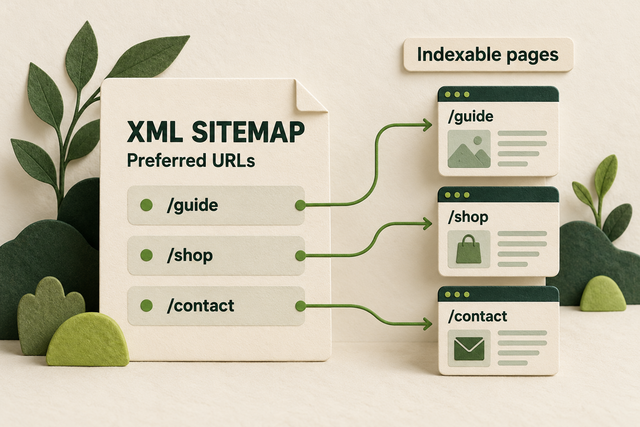
An XML sitemap lists /guide, /shop, and /contact as preferred URLs beside their indexable page cards.
Original illustration: a sitemap lists preferred indexable URLs.
Your working checklist

Work through the checklist

Click a square to mark a task as Pass. Click again to undo. Use the result menu for a problem, a blocker or a task that does not apply. You do not need to enter notes.

14 checks

Find and Validate Your Sitemap Files

A sitemap file lists page addresses; a sitemap index lists other sitemap files. Start with the published output so you can distinguish a broken file from a problem on one of its pages.

Find the sitemap and every child file

Identify the actual files that make up your sitemap.

Use this for: A site with an existing or newly generated sitemap.

In your website editor, look for its sitemap setting or generated sitemap address. You can also open /robots.txt on your public domain and look for a Sitemap line, or open Search Console → Sitemaps for a previously submitted address. Do not assume every site uses /sitemap.xml.

Open the address. If the XML root is sitemapindex, each loc beneath a sitemap element names a child file. Open those children before counting pages. A urlset file contains page entries beneath url elements.

Example

Hypothetical example: A shop has one index containing product and article sitemaps. Two index entries mean two child files, not two published pages.

  1. Find the sitemap address in your CMS, robots.txt or existing Search Console record.
  2. Identify whether its root is sitemapindex or urlset.
  3. Open each child in the scope of your audit and keep its address available.
More help and optional notesHigh · Website owner or SEO lead
PassThe sitemap and relevant child files are identified, and page lists are distinguished from index entries.
FailA known child file or sitemap source is missing from the audit scope.

If it fails: Ask the site owner where the CMS publishes its sitemap and add missing child files to the review.

Retest: Follow the index entries again and confirm the full intended file set.

Not applicable: No sitemap is used; decide whether one would help before starting the remaining checks.

Optional: the URL you checked, what you found and the next action. Keep confidential data out of shared exports.

No result recorded yet.

Changing this result updates your checkmark and progress immediately. Notes are optional.

Check that sitemap files load publicly

Find login screens, errors or stale sitemap addresses.

Use this for: Public sitemap files and indexes.

Open each sitemap in a private browser window. In Chrome Developer Tools → Network, reload, select the sitemap request and open Headers. Inspect its Status Code and the Response content. A successful request should return the sitemap, not a login form or an HTML error page.

If the old address redirects, use its final working sitemap address for discovery and submission. Test a failing child directly; a working index does not prove that its children load.

Example

Hypothetical example: The index opens, but products.xml returns a 403 access-denied page. Repair access to that public file before treating the product inventory as checked.

  1. Load the index and child files without a signed-in session.
  2. Read the request status and response content in Network.
  3. Give failed file addresses and response details to the site owner; retest after repair.
More help and optional notesHigh · SEO lead and developer
PassEvery reviewed sitemap address returns its intended file without login or error content.
FailA reviewed file fails, returns the wrong content or depends on authentication.

If it fails: Repair the sitemap route or public access rule, and replace obsolete discovery addresses.

Retest: Reload the exact sitemap request and check its response again.

Not applicable: No URLs in the stated scope.

Keep in mind: Your browser request cannot prove Googlebot access; the Sitemaps report supplies separate processing evidence.

Optional: the URL you checked, what you found and the next action. Keep confidential data out of shared exports.

No result recorded yet.

Changing this result updates your checkmark and progress immediately. Notes are optional.

Validate the XML structure and URL format

Catch markup and address errors before submission.

Use this for: XML URL sitemaps and sitemap indexes.

Use your sitemap generator’s validation result or ask the developer to parse the saved XML against the sitemap schema. In the file, a URL sitemap needs urlset, the sitemap namespace, and a loc inside each url. It must use UTF-8 and properly escape XML values.

Read representative loc values as well as the validation result. Each page address should be complete, including protocol and host, and should use the intended public domain. A browser stylesheet can make XML look like a table; inspect the underlying file when its format is unclear.

Example

Hypothetical example: The page address contains ?type=clay&size=large. In XML its ampersand is written as &, so the parser can read the full address.

  1. Validate the saved file with the generator or a developer’s XML parser/schema check.
  2. Check loc values for complete public addresses and correct escaping.
  3. Fix the generator or source data, then validate the regenerated file.
More help and optional notesHigh · SEO lead and developer

Before you begin: Access to the sitemap generator’s validation output or help from a developer.

PassThe reviewed file parses, matches the sitemap structure and contains correctly formed absolute loc values.
FailThe parser reports an XML/schema error, or a loc is relative, malformed or on an unintended host.

If it fails: Correct the emitting template or data; avoid patching only a temporary generated copy.

Retest: Regenerate the file and repeat validation and the loc sample.

Not applicable: No URLs in the stated scope.

Keep in mind: A file that opens without an XML syntax error can still have incorrect sitemap structure or membership.

More detail (optional)

A normal single-site sitemap follows host and file-location rules. If your organization intentionally uses cross-site submission, verify the ownership and submission arrangement instead of treating every different host as a defect.

Optional: the URL you checked, what you found and the next action. Keep confidential data out of shared exports.

No result recorded yet.

Changing this result updates your checkmark and progress immediately. Notes are optional.

Check the limits for each sitemap file

Keep large inventories within the supported file limits.

Use this for: Every sitemap file, especially large or compressed inventories.

Read the URL count and uncompressed byte size in your generator or sitemap audit report for each child file. Each URL sitemap can contain at most 50,000 URLs and be at most 50 MB uncompressed, which the protocol defines as 52,428,800 bytes. A small gzip download does not establish the uncompressed size.

When either limit is exceeded, ask the developer to split the output and list the resulting files in an index. Recheck every new child. Sensible grouping by content type can make future errors easier to isolate; it is not a ranking requirement.

Example

Hypothetical example: A compressed product sitemap is only 4 MB to download but expands beyond the allowed file size. Split it even if its URL count is below 50,000.

  1. Find each child file’s URL count and uncompressed size.
  2. Compare both measurements with the limits.
  3. Split oversized files and verify that the index lists working new children.
More help and optional notesHigh · SEO lead and developer
PassEach reviewed URL sitemap is within both limits and its index points to the intended children.
FailA file exceeds either limit or a split leaves missing or broken child references.

If it fails: Split the generator output and update the index to the new file set.

Retest: Recount URLs, remeasure uncompressed bytes and open every changed child.

Not applicable: No URLs in the stated scope.

More detail (optional)

A sitemap index also has file-size and entry limits; its entries are child sitemaps, not page URLs. Keep children in the supported directory/host scope unless an intentional cross-site submission arrangement applies.

Optional: the URL you checked, what you found and the next action. Keep confidential data out of shared exports.

No result recorded yet.

Changing this result updates your checkmark and progress immediately. Notes are optional.

Match Sitemap Entries to the Pages You Want in Search

Sitemap membership should follow your publishing decisions. Compare exact addresses with the pages you intend to offer in search, then investigate the differences rather than adding every URL your site can produce.

Find important published pages missing from the sitemap

Compare sitemap output with an independent page list.

Use this for: Published canonical pages that should be represented in the sitemap.

In your CMS, list the published service, product, category and guide pages you want discovered in search. Search the relevant child sitemap for each intended canonical address. Start with recent additions and one page from each template if a full check is too large.

A larger review can compare a site crawl with the sitemap inventory. If you use Screaming Frog, its sitemap-only list mode checks the supplied entries but cannot find pages missing from that input. Use an independent CMS list or a full site crawl to find omissions.

Example

Hypothetical example: A new delivery-area guide is published and linked from the service hub, but its content type is excluded by the sitemap generator. Add the wanted page type to that generator.

  1. Get an intended-page list from the CMS or publishing record.
  2. Compare exact preferred addresses with the relevant sitemap entries.
  3. Add unintended omissions through the generator and inspect the fresh output.
More help and optional notesHigh · Content editor and SEO lead
PassEvery intended URL in the reviewed scope is present in the correct sitemap inventory.
FailAn intended published URL is absent because of an incorrect generator rule or stale output.

If it fails: Correct the inclusion rule or regeneration process for the missing page.

Retest: Find the exact URL in the refreshed sitemap and open it.

Not applicable: No URLs in the stated scope.

Keep in mind: A representative sample cannot establish complete coverage of the site.

Optional: the URL you checked, what you found and the next action. Keep confidential data out of shared exports.

No result recorded yet.

Changing this result updates your checkmark and progress immediately. Notes are optional.

Remove intentionally excluded page types

Keep the search sitemap aligned with deliberate exclusions.

Use this for: Page types with explicit include/exclude decisions.

Compare the sitemap entries with your site’s intended exclusions, such as account pages, internal search results and confirmation pages. Open an example before deciding. A parameter in a URL is not automatically a reason to exclude it; it may identify a distinct useful page.

If the page is meant to stay outside search, exclude it from the sitemap generator. If a wanted page has an accidental noindex or crawl block, repair that page’s setting instead of hiding the problem by removing its entry. Removing a sitemap entry alone does not remove a page from Google.

Example

Hypothetical example: A public enquiry confirmation is intentionally noindex. Remove it from the search sitemap while keeping the confirmation available to customers.

  1. Choose a listed URL from each suspect page type.
  2. Confirm whether its exclusion from search is intentional.
  3. Remove intended exclusions from sitemap output, or repair accidental page restrictions.
More help and optional notesHigh · SEO lead and developer
PassReviewed sitemap entries match the intended search inclusion policy.
FailAn intentionally excluded page is listed, or a wanted page has a contradictory restriction left unresolved.

If it fails: Adjust the generator or the accidental page setting according to the intended outcome.

Retest: Check both the page’s intended state and its refreshed sitemap membership.

Not applicable: No URLs in the stated scope.

Keep in mind: Private information needs access control; sitemap exclusion is not privacy protection.

Optional: the URL you checked, what you found and the next action. Keep confidential data out of shared exports.

No result recorded yet.

Changing this result updates your checkmark and progress immediately. Notes are optional.

Replace redirects and broken page entries

List working final pages rather than obsolete addresses.

Use this for: Page URLs included in the sitemap.

Open a sample of listed page addresses in Chrome Developer Tools → Network. Reload and inspect the main document request before any redirect, then the final page. Check that it directly returns the expected content, not a redirect, error or empty not-found screen.

For a larger inventory, Screaming Frog → Mode → List → Upload → Download XML Sitemap can fetch the listed addresses. Review response codes and final destinations. Fix broken wanted pages; replace moved entries with the intended final URL; remove genuinely retired entries.

Example

Hypothetical example: The sitemap still lists /delivery-old/, which redirects to /delivery/. Replace the old entry with the current delivery page, then test the final page.

  1. Fetch the listed address and inspect its response and displayed content.
  2. Decide whether the page moved, was retired or is unexpectedly broken.
  3. Repair the page or update the sitemap to its intended working destination.
More help and optional notesHigh · SEO lead and developer
PassReviewed page entries directly return successful, intended content.
FailA reviewed entry redirects, fails or returns an error message under a successful status.

If it fails: Correct membership for moved/retired pages or repair a broken wanted route.

Retest: Fetch the regenerated entry and confirm its direct response and content.

Not applicable: No URLs in the stated scope.

Optional: the URL you checked, what you found and the next action. Keep confidential data out of shared exports.

No result recorded yet.

Changing this result updates your checkmark and progress immediately. Notes are optional.

Align listed URLs with the intended canonical

Avoid advertising competing versions of the same content.

Use this for: Listed pages with duplicate URL variants or canonical declarations.

Open a listed page, view its source and find rel="canonical". Compare the target with the sitemap address and your chosen representative URL. If the declaration points elsewhere, first decide which address is actually correct; the page template may be wrong.

Keep the intended representative in the sitemap and correct inconsistent declarations. Repeated inclusion of the same URL across valid files is not automatically a protocol error, but remove accidental duplicates when they make the inventory harder to maintain.

Example

Hypothetical example: The sitemap lists /pots/?ref=footer while the page names /pots/ as canonical. List the clean representative if both addresses show the same collection.

  1. Compare the sitemap address, declared canonical and intended representative.
  2. Resolve which signal is wrong before editing.
  3. Regenerate the sitemap or fix the page template, then compare them again.
More help and optional notesHigh · SEO lead and developer
PassThe sitemap and reviewed declarations agree with the intended representative URLs.
FailThe sitemap promotes a duplicate variant or conflicts with the intended canonical decision.

If it fails: Correct the wrong sitemap entry or canonical declaration at its source.

Retest: Recheck the live declaration and fresh sitemap entry for the same page.

Not applicable: No URLs in the stated scope.

Keep in mind: Sitemap inclusion is a canonical signal; it cannot force Google’s selection.

Optional: the URL you checked, what you found and the next action. Keep confidential data out of shared exports.

No result recorded yet.

Changing this result updates your checkmark and progress immediately. Notes are optional.

Keep Sitemap Dates and Updates Accurate

Sitemap dates and publishing rules should describe real changes. Test the generator’s behavior using pages whose history you know, so routine rebuilds do not create misleading freshness signals.

Compare lastmod with real page changes

Use dates that reflect meaningful updates to the listed page.

Use this for: Sitemaps that emit lastmod values.

Compare a page’s lastmod value with its revision history in your CMS. Review a page with a recent substantive edit and an older unchanged page. Changes to main content, structured data or useful links can justify a new date; a routine rebuild or copyright-year change alone does not.

If the generator uses the current request or deployment date for every page, ask the developer to use the significant-content modification date. When a dependable date is unavailable, omitting the optional lastmod is better than inventing one.

Example

Hypothetical example: A care guide was rewritten on 6 October, while an older sizing guide was untouched. The next deployment should not give both pages a new modification date.

  1. Read lastmod beside the exact URL in the child sitemap.
  2. Compare it with the CMS revision showing the meaningful page change.
  3. Correct the date source or omit unreliable values, then regenerate.
More help and optional notesHigh · Content editor and developer
PassChecked dates have valid formatting and correspond to meaningful changes on those pages.
FailDates are invented, malformed, in the future without justification or reset by unrelated regeneration.

If it fails: Use the page’s meaningful-change timestamp or omit unreliable optional dates.

Retest: Compare the regenerated dates with the same edited and unchanged control pages.

Not applicable: The sitemap deliberately omits optional lastmod values.

More detail (optional)

In a sitemap index, lastmod describes the child sitemap file’s modification, not each listed page. Check those timestamps at the correct level. Google ignores priority and changefreq; changing them is not a substitute for fixing inaccurate dates.

Optional: the URL you checked, what you found and the next action. Keep confidential data out of shared exports.

No result recorded yet.

Changing this result updates your checkmark and progress immediately. Notes are optional.

Check that publishing changes update the sitemap

Find stale generators and accidental inventory losses.

Use this for: Sites whose content changes after the sitemap is generated.

Use a recent approved publishing change as your test: a new page, a meaningful edit or a retired page. Compare the public sitemap with what the change should have done. You do not need to publish a dummy page just to run this check.

If you have before-and-after exports, compare exact URL additions and removals. Equal totals can hide a missing page replaced by an unwanted one. Ask the developer to fix the CMS query, regeneration hook or stale file when output does not follow the actual publishing state.

Example

Hypothetical example: A release adds two guides and retires none, but the sitemap gains two addresses and loses a service page. Investigate the unexpected removal even though the total looks plausible.

  1. Identify a real publishing change and its expected membership/date change.
  2. Compare the fresh sitemap with that expectation and any earlier URL list.
  3. Repair stale or incorrect output and check the changed pages again.
More help and optional notesHigh · SEO lead and developer
PassThe reviewed publishing changes appear correctly without unexplained URL losses or additions.
FailThe public sitemap stays stale or changes unrelated membership unexpectedly.

If it fails: Repair generator filters, update triggers or stale serving according to the observed cause.

Retest: Repeat the comparison after regeneration and confirm unchanged controls remain correct.

Not applicable: No URLs in the stated scope.

Keep in mind: If no relevant publishing change or history is available, leave this test untested until one can be checked.

Optional: the URL you checked, what you found and the next action. Keep confidential data out of shared exports.

No result recorded yet.

Changing this result updates your checkmark and progress immediately. Notes are optional.

Point robots.txt to the current sitemap

Expose the final public sitemap address through a stable discovery route.

Use this for: Sites using a robots.txt sitemap declaration.

Open /robots.txt on the site’s public host and find its Sitemap lines. Copy each address into a fresh tab. It should identify the intended current file, including protocol and host. A single line for an index can expose its child sitemaps.

If you choose robots.txt as a discovery method and the reference is missing or stale, ask the site owner to add or correct it. Do not rewrite unrelated crawl rules as part of this change. Search Console submission is another supported discovery method.

Example

Hypothetical example: The Sitemap line still names a staging host. Replace it with the public sitemap-index address and open that exact address to verify it.

  1. Read the Sitemap lines in the public robots.txt file.
  2. Open the declared addresses and compare them with the current file inventory.
  3. Correct missing or obsolete references if this discovery method is used.
More help and optional notesHigh · SEO lead and developer
PassThe intended robots.txt declaration resolves to the current public sitemap or index.
FailA declaration names the wrong host, an obsolete file or a failing address.

If it fails: Update the Sitemap line without altering unrelated Allow or Disallow rules.

Retest: Reload robots.txt and follow the revised address.

Not applicable: The site deliberately uses another supported discovery method and has no robots.txt sitemap declaration.

Optional: the URL you checked, what you found and the next action. Keep confidential data out of shared exports.

No result recorded yet.

Changing this result updates your checkmark and progress immediately. Notes are optional.

Submit the Sitemap and Check What Was Processed

Search Console can report whether Google fetched and read a submitted sitemap. Keep that file result separate from whether an individual page has been crawled, selected as canonical or indexed.

Submit the final sitemap address in Search Console

Give Google the tested location and make processing visible.

Use this for: Sites where Search Console sitemap submission or review is part of the workflow.

In Search Console, select the property covering the public site and open Sitemaps. With owner permissions, enter the final working sitemap or index address under Add a new sitemap and choose Submit. The file must already be published on your site; this field does not upload an XML file.

If the correct file is already submitted, review its existing row instead of repeatedly submitting an unchanged file. An empty report does not prove Google has never discovered a sitemap through robots.txt. If owner access is missing, mark this check Blocked.

Example

Hypothetical example: A site uses a sitemap index with several children. Submit the tested index address, then use its row to inspect processing rather than pasting a local XML filename.

  1. Open the correct property’s Sitemaps report.
  2. Submit the final public address if needed, or open its existing row.
  3. Confirm the report contains the intended submitted address.
More help and optional notesMedium · SEO lead and developer

Before you begin: Owner permission in the correct Search Console property for a new submission.

PassThe correct public sitemap address appears in the report as submitted.
FailThe submitted address is wrong, obsolete or not yet publicly available.

If it fails: Publish/test the file first, then submit the correct final address.

Retest: Check the submitted row and the processing result separately.

Not applicable: No URLs in the stated scope.

Keep in mind: This pass confirms submission only. It does not confirm successful processing or page indexing.

More detail (optional)

Do not use an old Google sitemap ping URL as a submission workflow; that endpoint was retired.

Optional: the URL you checked, what you found and the next action. Keep confidential data out of shared exports.

No result recorded yet.

Changing this result updates your checkmark and progress immediately. Notes are optional.

Read processing errors and the last-read date

Separate a current file problem from an older report.

Use this for: Submitted sitemaps with Search Console processing data.

Open the sitemap’s row in Search Console → Sitemaps. Read Status and Last read, then open error details when present. Compare the read date with the time you fixed or regenerated the file. A report from before the repair cannot confirm the repaired version.

For a fetch failure, retest the file address and public access. For a parsing error, locate the reported file or line and repair the generator. Resubmit after fixing a persistent failure, then check the later result. Success means the file was fetched and read, not that all listed pages entered search.

Example

Hypothetical example: The report shows an XML error from yesterday, but the repaired sitemap was published today. Verify the live XML, then wait for a newer processing result before calling it confirmed.

  1. Read the submitted file’s status, last-read date and any error details.
  2. Match the reported problem to a current fetch or parsing test.
  3. Repair and retest, then check a later Search Console processing result.
More help and optional notesMedium · SEO lead and developer

Before you begin: Access to the relevant Search Console property.

PassA processing result after the relevant change reports successful fetching and reading.
FailA current processing result still reports a fetch or parsing failure.

If it fails: Repair the reported file-level failure and resubmit when appropriate.

Retest: Review a newer processing result for the same sitemap.

Not applicable: No URLs in the stated scope.

Keep in mind: A pending or older result remains unconfirmed; it is not an automatic pass or fail.

Optional: the URL you checked, what you found and the next action. Keep confidential data out of shared exports.

No result recorded yet.

Changing this result updates your checkmark and progress immediately. Notes are optional.

Inspect a listed page when indexing remains unclear

Move from file processing to the specific page decision.

Use this for: A listed page whose search state needs investigation.

When a sitemap is read successfully but a wanted page is absent from search, inspect that exact address in Search Console → URL Inspection. Open Page indexing and read its status, last crawl and canonical fields. Compare the crawl date with your latest page change.

Classify the result before changing the sitemap again. An intended duplicate can correctly select another URL. A wanted page with an accidental exclusion needs a page-level repair. A page awaiting a newer crawl has a different next step from an XML parsing failure.

Example

Hypothetical example: The sitemap is processed, but a listed guide’s indexed record shows an old noindex. Check the current page directive and its crawl date instead of resubmitting the sitemap repeatedly.

  1. Inspect one affected exact URL and open its indexed Page indexing record.
  2. Compare the recorded state and crawl date with the intended page and current output.
  3. Use the relevant page-level checklist for the unresolved condition.
More help and optional notesMedium · SEO lead and developer

Before you begin: Access to URL Inspection for the page.

PassThe inspected record is interpreted against the intended page state and the next specific check is identified.
FailThe investigation treats sitemap processing alone as proof of page indexing or leaves a reported page condition unexplained.

If it fails: Inspect the individual page and follow its reported condition rather than changing the sitemap without evidence.

Retest: After a page repair, repeat the live check and review a later indexed record separately.

Not applicable: No page-level indexing question is being investigated.

Keep in mind: This is an investigation task. Passing it does not mean the page is indexed.

Optional: the URL you checked, what you found and the next action. Keep confidential data out of shared exports.

No result recorded yet.

Changing this result updates your checkmark and progress immediately. Notes are optional.

Reset this checklist?

This removes saved statuses, evidence and result dates for the checks on this page. Other checklists keep their records. Export a CSV first if you need a copy.

A useful result, every time

Check a task. Choose a result.

This is a manual SEO workflow. It helps you decide what to investigate and keep a usable record. It does not crawl your website or verify your answers automatically.

  1. Choose your scope. Pick the relevant task group and representative pages you are authorized to inspect.
  2. Run the stated check. Follow the steps, then choose your result. Click the square for Pass, or use the result menu for another status. You do not need to type anything.
  3. Assign the next action. Fix a problem when you can, or ask the right person for help. Optional notes can remind you what to do next. Check the result again after a fix.

What your progress means

Review progress counts passes and failures against applicable checks. Failed work still counts as reviewed. Blocked and untested checks remain unfinished. This is not an SEO score.

Untested
You have not checked this yet.
Pass
You checked it and it works as described.
Fail
You checked it and found something to fix.
Blocked
You need access, information or someone’s help.
Not applicable
This task does not apply to your website.

Export CSV downloads the checks currently shown and any optional notes. Print expands the instructions for that view. Saved results stay in this browser; there is no account sync.

Apply the workflow

What Should You Keep After the Sitemap Audit?

Keep the URL membership decisions and the file-processing result separate, so each repair has a clear next check.

How Do You Build a Sitemap Inclusion and Exclusion List?

Build a sitemap inclusion and exclusion list from the pages you actually intend to publish for search. Keep the decision, observed output and next action separate. A page can be correctly absent; a listed page can still need repair.

Use the table as a working format in your own spreadsheet or project notes. The examples below are hypothetical. If you use this checklist’s Export CSV, it saves the checks currently shown and your optional notes; it does not scan your sitemap or generate this URL inventory automatically.

Hypothetical sitemap membership decisions and a reusable row format.
Page or URL typeIntended membershipObserved conditionDecision / next action
/guides/clay-pot-care/IncludePublished preferred guide missing from article sitemapFix the article inclusion rule and check the new file.
/enquiry-confirmation/ExcludeIntentionally noindex but listedRemove from the search sitemap; keep the intended page exclusion.
/delivery-old/ReplaceRedirects to /delivery/List the intended final delivery URL.
/pots/?ref=footerExclude duplicateSame collection; canonical names /pots/List /pots/ and use it in relevant internal links.
Your exact URLInclude / exclude / replaceCurrent response, declared canonical and membershipOwner, next change and retest result if useful.

What Does a Minimal XML Sitemap Look Like?

A minimal XML sitemap uses the sitemap namespace and gives each page a complete loc value. The optional lastmod below is appropriate only if that hypothetical guide had a meaningful update on the stated date. Replace the sample domain and page with your own intended public URL.

Validate the generated output as well as its entries. A neat-looking file can still list the wrong page, and adding optional tags does not solve that membership problem.

Illustrative XML only; this is not a sitemap generated from your website.

<?xml version="1.0" encoding="UTF-8"?>
<urlset xmlns="http://www.sitemaps.org/schemas/sitemap/0.9">
  <url>
    <loc>https://example.com/guides/clay-pot-care/</loc>
    <lastmod>2026-10-06</lastmod>
  </url>
</urlset>

Does Every Website Need an XML Sitemap?

An XML sitemap is especially useful when a site has many pages, frequently changing content or pages that are difficult to discover through links. A small site with clear internal navigation may already be discoverable without one. The decision depends on the site’s discovery needs.

Keep useful internal links even when a sitemap is present. Submitting a file is a hint, and neither a sitemap nor a completed checklist guarantees that Google will crawl or index its pages.

Which Checklist Helps Fix a Sitemap Finding?

Follow the finding to the workflow that owns it. A file-format problem belongs here; a competing representative URL or an unexplained page exclusion needs a more focused page-level review.

A clear process, with honest limits.

Follow the steps, choose the result that matches what you found, and check again after changes. Notes are optional. A completed check does not guarantee indexing, traffic or rankings. How the checklists work.