
Technical SEO · Supporting checklist

Rendering Parity SEO Checklist

Rendering parity means the important public content and SEO signals remain consistent across the representations that visitors and search systems can access. Compare meaning and availability, not pixel-perfect screenshots or identical source code.

Free to useNo account neededSaved in your browser
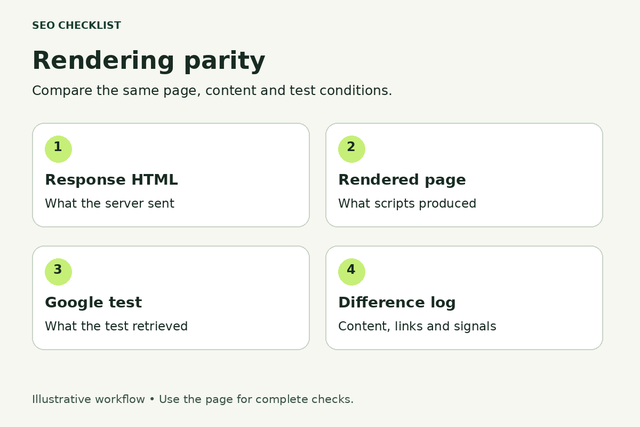
A rendering comparison records response HTML, rendered page, Google test output and meaningful differences.
Compare the same page, content and test conditions.
Your working checklist

Work through the checklist

Click a square to mark a task as Pass. Click again to undo. Use the result menu for a problem, a blocker or a task that does not apply. You do not need to enter notes.

12 checks

Set up a fair comparison

Choose comparable states and identify meaningful content differences.

Choose representative public states

Make comparisons reproducible.

Use this for: Public pages and their required resources within the sampled template or URL group.

Pick one URL from each important template and include a recently changed page. Define what an anonymous visitor should see before comparing tools. Keep URL, language, device class and consent state consistent so expected personalization is not mistaken for missing content.

Compare the same URL and intended public state. Record a short finding only if it helps you or the person making the fix; no screenshot or evidence upload is required to complete this checklist.

Example

Hypothetical example: A product comparison uses the same English product URL, not an English desktop page against a translated mobile page.

  1. List the templates that earn or need search traffic.
  2. Choose a normal page and an edge case for each.
  3. Write the expected headline, main answer and primary destination.
More help and optional notesHigh · Site owner with developer or platform support where needed.

Before you begin: Permission to inspect the relevant site or diagnostic account.

PassThe sample and expected public content are clear.
FailDifferent states are compared without explaining the difference.

If it fails: Create a small URL-by-state matrix before investigating discrepancies.

Retest: Repeat the same comparison after the change, then check another URL using the same template or rule.

Not applicable: The tested feature or response variant does not exist.

Keep in mind: A passing sample does not establish that every URL behaves correctly or guarantee indexing.

Optional: URL, time, expected result, observed result and next action. Keep confidential data out of shared exports.

No result recorded yet.

Changing this result updates your checkmark and progress immediately. Notes are optional.

Separate the response from the rendered page

Find where useful content appears.

Use this for: Public pages and their required resources within the sampled template or URL group.

View the original page response and the rendered browser DOM using available browser tools. These are different representations: JavaScript can legitimately add content later. Flag missing critical content in the rendered result, not every difference from the original HTML. Ask a developer for help if the tools are unfamiliar.

Compare the same URL and intended public state. Record a short finding only if it helps you or the person making the fix; no screenshot or evidence upload is required to complete this checklist.

Example

Hypothetical example: The response contains a shell, but the rendered DOM contains the complete guide; this needs rendering checks, not an automatic failure.

  1. Open the public page in a fresh session.
  2. Compare the initial response with the final DOM.
  3. Note which representation contains the main answer and links.
More help and optional notesHigh · Site owner with developer or platform support where needed.

Before you begin: Permission to inspect the relevant site or diagnostic account.

PassThe main content is available in the rendered public page and its delivery is understood.
FailThe final DOM lacks important content or only paints text into an inaccessible visual surface.

If it fails: Move essential text into accessible HTML and investigate rendering failures with the JavaScript checklist.

Retest: Repeat the same comparison after the change, then check another URL using the same template or rule.

Not applicable: The tested feature or response variant does not exist.

Keep in mind: A passing sample does not establish that every URL behaves correctly or guarantee indexing.

Optional: URL, time, expected result, observed result and next action. Keep confidential data out of shared exports.

No result recorded yet.

Changing this result updates your checkmark and progress immediately. Notes are optional.

Compare the main answer, not identical markup

Protect substantive equivalence.

Use this for: Public pages and their required resources within the sampled template or URL group.

Compare headings, main explanations, important facts and the purpose of the page across the tested representations. Minor layout changes, generated IDs and different wrappers are not SEO parity failures. Prioritize differences that change what the page says, which entity it describes or whether a visitor can complete the task.

Compare the same URL and intended public state. Record a short finding only if it helps you or the person making the fix; no screenshot or evidence upload is required to complete this checklist.

Example

Hypothetical example: A mobile pricing page omits the plan limitations that are visible on desktop.

  1. Identify the main answer and key qualifications.
  2. Read them in each tested representation.
  3. Classify missing, contradictory and harmless differences separately.
More help and optional notesHigh · Site owner with developer or platform support where needed.

Before you begin: Permission to inspect the relevant site or diagnostic account.

PassImportant information and qualifications remain equivalent.
FailA representation changes the central answer or omits essential facts.

If it fails: Restore the missing substance in the shared public template.

Retest: Repeat the same comparison after the change, then check another URL using the same template or rule.

Not applicable: The tested feature or response variant does not exist.

Keep in mind: A passing sample does not establish that every URL behaves correctly or guarantee indexing.

Optional: URL, time, expected result, observed result and next action. Keep confidential data out of shared exports.

No result recorded yet.

Changing this result updates your checkmark and progress immediately. Notes are optional.

Check mobile content without requiring interaction

Keep important information available on mobile.

Use this for: Public pages and their required resources within the sampled template or URL group.

Use a narrow viewport and compare the main content with desktop. Collapsible presentation can be appropriate, but essential information must not depend on a search crawler clicking a tab, submitting a form or performing a swipe. Test availability, rather than insisting that all content be visually expanded.

Compare the same URL and intended public state. Record a short finding only if it helps you or the person making the fix; no screenshot or evidence upload is required to complete this checklist.

Example

Hypothetical example: A specification table exists only after a mobile button downloads it.

  1. Open the same URL at mobile width.
  2. Inspect whether essential text is already available.
  3. Check important images and navigation as well as the first screen.
More help and optional notesHigh · Site owner with developer or platform support where needed.

Before you begin: Permission to inspect the relevant site or diagnostic account.

PassMobile retains the important content and accessible signals.
FailImportant mobile content only appears after a required user action.

If it fails: Include essential information in the initial or reliably rendered public content.

Retest: Repeat the same comparison after the change, then check another URL using the same template or rule.

Not applicable: The tested feature or response variant does not exist.

Keep in mind: A passing sample does not establish that every URL behaves correctly or guarantee indexing.

Optional: URL, time, expected result, observed result and next action. Keep confidential data out of shared exports.

No result recorded yet.

Changing this result updates your checkmark and progress immediately. Notes are optional.

Compare discovery and meaning

Check links, identity, structured data and essential media.

Compare link destinations across representations

Preserve the paths to related pages.

Use this for: Public pages and their required resources within the sampled template or URL group.

Compare meaningful internal links in the public DOM, including category, pagination and contextual links. Check their destinations, not only their labels. A visible control is not necessarily a crawlable link; use ordinary anchors with usable href values for navigation.

Compare the same URL and intended public state. Record a short finding only if it helps you or the person making the fix; no screenshot or evidence upload is required to complete this checklist.

Example

Hypothetical example: Desktop links to a category while mobile displays the same label as a button with no destination.

  1. Choose the key next-step links.
  2. Inspect each destination in the DOM.
  3. Open a few targets directly to confirm the intended page.
More help and optional notesHigh · Site owner with developer or platform support where needed.

Before you begin: Permission to inspect the relevant site or diagnostic account.

PassImportant navigation has equivalent working destinations.
FailA representation drops key links or replaces them with non-link controls.

If it fails: Use real links and retain useful connections in each layout.

Retest: Repeat the same comparison after the change, then check another URL using the same template or rule.

Not applicable: The tested feature or response variant does not exist.

Keep in mind: A passing sample does not establish that every URL behaves correctly or guarantee indexing.

Optional: URL, time, expected result, observed result and next action. Keep confidential data out of shared exports.

No result recorded yet.

Changing this result updates your checkmark and progress immediately. Notes are optional.

Compare canonical and indexing signals

Catch contradictory page identity.

Use this for: Public pages and their required resources within the sampled template or URL group.

Compare the response and final DOM for canonical and robots directives, then compare the intended values across public variants. Do not treat a later script change as a reliable rescue for an initial noindex. If signals conflict, investigate the template rather than copying whichever output looks preferable.

Compare the same URL and intended public state. Record a short finding only if it helps you or the person making the fix; no screenshot or evidence upload is required to complete this checklist.

Example

Hypothetical example: The page renders the right guide but retains a canonical pointing to the previous article.

  1. Check the intended canonical URL.
  2. Inspect robots directives and response headers with technical help if needed.
  3. Compare values after rendering and across variants.
More help and optional notesHigh · Site owner with developer or platform support where needed.

Before you begin: Permission to inspect the relevant site or diagnostic account.

PassCanonical and indexing directives consistently reflect the intended page.
FailConflicting directives or stale identity signals appear.

If it fails: Correct the source template and validate using the canonical and meta robots checklists.

Retest: Repeat the same comparison after the change, then check another URL using the same template or rule.

Not applicable: The tested feature or response variant does not exist.

Keep in mind: A passing sample does not establish that every URL behaves correctly or guarantee indexing.

Optional: URL, time, expected result, observed result and next action. Keep confidential data out of shared exports.

No result recorded yet.

Changing this result updates your checkmark and progress immediately. Notes are optional.

Match structured data to the visible facts

Avoid describing a different page.

Use this for: Public pages and their required resources within the sampled template or URL group.

Compare the structured data with what anonymous visitors can actually read on that URL. Check names, availability and other relevant fields after updates. Equivalent markup need not have identical property order, but it must not describe an old entity or unsupported claims.

Compare the same URL and intended public state. Record a short finding only if it helps you or the person making the fix; no screenshot or evidence upload is required to complete this checklist.

Example

Hypothetical example: A rendered article title changes while its Article markup still names the previous article.

  1. Read the visible page facts.
  2. Inspect the structured data with a testing tool.
  3. Compare entity identifiers and important values.
More help and optional notesMedium · Site owner with developer or platform support where needed.

Before you begin: Permission to inspect the relevant site or diagnostic account.

PassMarkup describes the visible current page.
FailMarkup contains stale or unsupported facts.

If it fails: Update the shared content source and retest visible content and markup together.

Retest: Repeat the same comparison after the change, then check another URL using the same template or rule.

Not applicable: The tested feature or response variant does not exist.

Keep in mind: A passing sample does not establish that every URL behaves correctly or guarantee indexing.

Optional: URL, time, expected result, observed result and next action. Keep confidential data out of shared exports.

No result recorded yet.

Changing this result updates your checkmark and progress immediately. Notes are optional.

Check image meaning and media fallbacks

Keep essential visual information accessible.

Use this for: Public pages and their required resources within the sampled template or URL group.

Compare important image URLs, descriptive alternatives and nearby explanations across variants. Focus on diagrams or images needed to understand the page, not decorative spacing. Confirm that lazy loading does not leave essential media unavailable in the tested rendering result.

Compare the same URL and intended public state. Record a short finding only if it helps you or the person making the fix; no screenshot or evidence upload is required to complete this checklist.

Example

Hypothetical example: A tutorial diagram is replaced by an empty placeholder on mobile.

  1. Identify images that convey important information.
  2. Inspect their availability and appropriate alternative text.
  3. Check the rendered result without manually triggering every control.
More help and optional notesMedium · Site owner with developer or platform support where needed.

Before you begin: Permission to inspect the relevant site or diagnostic account.

PassEssential media or equivalent explanatory content is available.
FailA required image remains missing or loses its meaning.

If it fails: Repair resource loading and provide appropriate text alternatives.

Retest: Repeat the same comparison after the change, then check another URL using the same template or rule.

Not applicable: The tested feature or response variant does not exist.

Keep in mind: A passing sample does not establish that every URL behaves correctly or guarantee indexing.

Optional: URL, time, expected result, observed result and next action. Keep confidential data out of shared exports.

No result recorded yet.

Changing this result updates your checkmark and progress immediately. Notes are optional.

Test access paths and close the gaps

Compare clean sessions, route transitions and diagnostic evidence.

Test a clean anonymous session

Identify dependency on saved state.

Use this for: Public pages and their required resources within the sampled template or URL group.

Open the URL without a signed-in account or prior site storage. Public search content should not accidentally depend on a previous visit, saved cart or staff cookie. Consent and age restrictions may have legitimate requirements; escalate these instead of removing them for SEO.

Compare the same URL and intended public state. Record a short finding only if it helps you or the person making the fix; no screenshot or evidence upload is required to complete this checklist.

Example

Hypothetical example: A guide loads only after a returning visitor has a preference cookie.

  1. Use a fresh private window.
  2. Visit the URL directly.
  3. Compare the public main content with the normal session.
More help and optional notesHigh · Site owner with developer or platform support where needed.

Before you begin: Permission to inspect the relevant site or diagnostic account.

PassExpected public content is available without unintended saved state.
FailOnly returning visitors or staff can see content meant to be public.

If it fails: Remove unintended state dependencies while preserving required privacy and access controls.

Retest: Repeat the same comparison after the change, then check another URL using the same template or rule.

Not applicable: The tested feature or response variant does not exist.

Keep in mind: A passing sample does not establish that every URL behaves correctly or guarantee indexing.

Optional: URL, time, expected result, observed result and next action. Keep confidential data out of shared exports.

No result recorded yet.

Changing this result updates your checkmark and progress immediately. Notes are optional.

Compare direct entry with client-side navigation

Catch route and hydration mismatches.

Use this for: Public pages and their required resources within the sampled template or URL group.

Visit a deep URL directly and then navigate to it from another page. Compare the main answer, title and identity signals after each route settles. This isolates problems where the application updates the screen but retains metadata or content from the previous route.

Compare the same URL and intended public state. Record a short finding only if it helps you or the person making the fix; no screenshot or evidence upload is required to complete this checklist.

Example

Hypothetical example: An internal click opens the correct product but keeps the previous product title.

  1. Open the deep URL in a new tab.
  2. Reach it through a normal internal link.
  3. Compare content and metadata once both have loaded.
More help and optional notesHigh · Site owner with developer or platform support where needed.

Before you begin: Permission to inspect the relevant site or diagnostic account.

PassBoth routes resolve to equivalent content and identity.
FailNavigation retains stale content or produces an empty direct-entry page.

If it fails: Ask the developer to synchronize route data and server responses.

Retest: Repeat the same comparison after the change, then check another URL using the same template or rule.

Not applicable: The tested feature or response variant does not exist.

Keep in mind: A passing sample does not establish that every URL behaves correctly or guarantee indexing.

Optional: URL, time, expected result, observed result and next action. Keep confidential data out of shared exports.

No result recorded yet.

Changing this result updates your checkmark and progress immediately. Notes are optional.

Compare Google diagnostics with the public result

Use crawler evidence without overstating it.

Use this for: Public pages and their required resources within the sampled template or URL group.

For a property you control, inspect a representative URL in Search Console and use the available live test. Compare the rendered HTML, screenshot and resource problems with your expected public page. A live test is a diagnostic snapshot, not proof that the indexed version has changed.

Compare the same URL and intended public state. Record a short finding only if it helps you or the person making the fix; no screenshot or evidence upload is required to complete this checklist.

Example

Hypothetical example: The browser shows an answer but the test reports a blocked script needed to display it.

  1. Run the available inspection test.
  2. Review rendered output and failed resources.
  3. Separate current live findings from indexed-page information.
More help and optional notesHigh · Site owner with developer or platform support where needed.

Before you begin: Permission to inspect the relevant site or diagnostic account.

PassThe diagnostic result contains the important expected content or any uncertainty is explicitly investigated.
FailImportant content is missing and the cause remains unresolved.

If it fails: Resolve access or rendering failures, then repeat the diagnostic comparison.

Retest: Repeat the same comparison after the change, then check another URL using the same template or rule.

Not applicable: The tested feature or response variant does not exist.

Keep in mind: A passing sample does not establish that every URL behaves correctly or guarantee indexing.

Optional: URL, time, expected result, observed result and next action. Keep confidential data out of shared exports.

No result recorded yet.

Changing this result updates your checkmark and progress immediately. Notes are optional.

Retest meaningful differences after release

Close the loop without bot-only content.

Use this for: Public pages and their required resources within the sampled template or URL group.

Group failures by template and prioritize missing answers, wrong indexing signals and broken discovery paths. After a fix, repeat the same comparison and test another page from that group. Do not solve discrepancies by serving search engines unrelated text or by building a bot-only version of the offer.

Compare the same URL and intended public state. Record a short finding only if it helps you or the person making the fix; no screenshot or evidence upload is required to complete this checklist.

Example

Hypothetical example: One shared component fix restores specifications across the product template, then a second product is checked.

  1. Assign each substantive failure to an owner.
  2. Retest the original sample after deployment.
  3. Check another affected URL and monitor later diagnostic evidence.
More help and optional notesHigh · Site owner with developer or platform support where needed.

Before you begin: Permission to inspect the relevant site or diagnostic account.

PassMeaningful discrepancies are resolved and related samples remain correct.
FailOnly a cosmetic screenshot match is checked or bots receive materially different content.

If it fails: Fix the shared delivery path; treat dynamic rendering as a limited workaround rather than a default architecture.

Retest: Repeat the same comparison after the change, then check another URL using the same template or rule.

Not applicable: The tested feature or response variant does not exist.

Keep in mind: A passing sample does not establish that every URL behaves correctly or guarantee indexing.

Optional: URL, time, expected result, observed result and next action. Keep confidential data out of shared exports.

No result recorded yet.

Changing this result updates your checkmark and progress immediately. Notes are optional.

Reset this checklist?

This removes saved statuses, evidence and result dates for the checks on this page. Other checklists keep their records. Export a CSV first if you need a copy.

A useful result, every time

Check a task. Choose a result.

This is a manual SEO workflow. It helps you decide what to investigate and keep a usable record. It does not crawl your website or verify your answers automatically.

  1. Choose your scope. Pick the relevant task group and representative pages you are authorized to inspect.
  2. Run the stated check. Follow the steps, then choose your result. Click the square for Pass, or use the result menu for another status. You do not need to type anything.
  3. Assign the next action. Fix a problem when you can, or ask the right person for help. Optional notes can remind you what to do next. Check the result again after a fix.

What your progress means

Review progress counts passes and failures against applicable checks. Failed work still counts as reviewed. Blocked and untested checks remain unfinished. This is not an SEO score.

Untested
You have not checked this yet.
Pass
You checked it and it works as described.
Fail
You checked it and found something to fix.
Blocked
You need access, information or someone’s help.
Not applicable
This task does not apply to your website.

Export CSV downloads the checks currently shown and any optional notes. Print expands the instructions for that view. Saved results stay in this browser; there is no account sync.

Apply the workflow

Use the specialist checklist for the underlying fix

This page diagnoses its specific failure class. Use the related guides below when the issue needs a broader technical change.

Does rendering parity mean identical HTML?

No. Different markup, layout and generated attributes can deliver equivalent useful content. Focus on the main answer, important qualifications, links and page identity. A substantial missing section matters more than a changed wrapper element.

What is the difference between rendering parity and JavaScript SEO?

Rendering parity is the comparison: does the intended content survive across relevant states? JavaScript SEO covers the wider implementation that makes crawling and rendering work. Use this checklist to isolate the difference, then the JavaScript guide to address loading and rendering causes.

Can a successful live test prove a page is indexed?

No. A live diagnostic describes the tested fetch and rendering attempt. It does not establish that the indexed version is current or guarantee inclusion in search. Compare indexed information separately and keep unresolved differences visible.

Should every website use dynamic rendering?

No. Google treats dynamic rendering as a workaround rather than a recommended long-term solution. Prefer a delivery architecture that gives visitors and search systems equivalent useful public content; do not serve unrelated content to bots.

Connect This Review to Your Technical Audit

Use this specialist workflow for the specific issue, then review the wider technical conditions separately.

A clear process, with honest limits.

Follow the steps, choose the result that matches what you found, and check again after changes. Notes are optional. A completed check does not guarantee indexing, traffic or rankings. How the checklists work.